

Description
Download DAV Player Plus APK – View DAV Backup Files, Surveillance Tools, Android Security Software
Overview
DAV Player Plus is a specialized Android application designed to help users view DAV backup files generated by security recorders from brands such as Dahua, KBVision, and Panasonic. The software serves as a direct tool for accessing recorded surveillance data on mobile devices, enabling users to review video footage without requiring a computer or dedicated monitoring system. This functionality is particularly useful for technicians, security professionals, and on-site personnel who need quick access to backup recordings during inspections, troubleshooting, or client demonstrations.
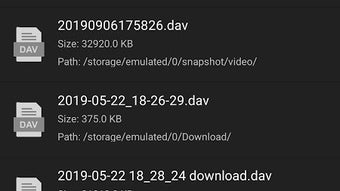
The app operates by automatically scanning the device’s internal memory and external storage for DAV files, streamlining the process of locating and opening relevant recordings. Once found, the files are displayed in a simple, organized interface for immediate playback. The developer, iFAST TEAM, has positioned the app as a lightweight utility tailored for mobile access to surveillance data, emphasizing ease of use and direct file compatibility.
While the app is currently free to download and use, the developer has indicated plans to introduce a multiple-channel view feature in an upcoming update. This suggests ongoing development and a focus on expanding functionality to better support complex surveillance setups. The app’s primary use case revolves around field access to backup recordings, making it a practical choice for users who manage or maintain video surveillance systems.
Key Features & Capabilities
- DAV File Support – Designed specifically to read and play DAV backup files from Dahua, KBVision, Panasonic, and similar recorder models, ensuring compatibility with common surveillance system outputs.
- Automatic File Search – Scans internal and external storage to locate DAV files without manual navigation, reducing time and effort for users.
- Recent Files History – Maintains a record of the most recently viewed files, allowing quick access to frequently used recordings.
- Mobile Playback – Enables direct playback of surveillance videos on Android devices, supporting on-the-go review of recorded footage.
- Future Feature Roadmap – The developer has confirmed upcoming updates, including a multiple-channel view feature, indicating potential for enhanced functionality.
These capabilities make DAV Player Plus ideal for professionals who need to verify recordings during site visits or provide evidence to clients. For example, a technician can use the app to check footage from a specific camera after a system failure, or a security manager can review a recent incident while off-site. The app’s focus on automation and accessibility aligns with the growing need for mobile tools in surveillance management.
User Interface, Workflow & Performance
DAV Player Plus features a clean, minimalistic interface optimized for Android devices. The main screen displays a list of detected DAV files, with basic metadata such as file name and date. Navigation is straightforward, relying on tap-based interactions to select and play recordings. The playback controls are standard, including play, pause, and seek functions, ensuring familiarity for most users.
Workflow efficiency is enhanced by the automatic file search and history tracking. Users do not need to manually browse through folders to locate specific backups, which reduces friction in time-sensitive scenarios. The app’s performance is expected to be stable for typical playback tasks, though detailed performance metrics such as CPU or RAM usage were not specified by the developer.
Based on general behavior of similar lightweight Android utilities, the app likely maintains low resource consumption during playback. However, exact performance details were not provided. Stability during extended playback sessions or with large file sizes remains unverified. The developer has not shared information about crash rates, background operation, or memory handling.
Compatibility & System Requirements
DAV Player Plus is designed for Android devices and is available through the Google Play Store. The app supports a wide range of Android versions, though specific OS compatibility details were not listed by the developer. Installation size is not publicly disclosed, but given its focused functionality, it is expected to be a lightweight application.
Hardware requirements are not specified, but the app is likely optimized for standard Android smartphones and tablets. Users should ensure their devices have sufficient storage space to accommodate DAV files, which can be large due to video compression and resolution. The app does not require root access or special permissions beyond basic storage access.
Exact system requirements were not listed. Compatibility information was partially provided, and users are advised to check the app’s official page for the most accurate details before installation.
Pros and Cons
Pros
- Free to download and use with no in-app purchases
- Automatically detects DAV files across storage locations
- Simple, intuitive interface for quick access to recordings
- Includes a recent files history for faster navigation
- Developed by a dedicated team with future updates planned
Cons
- No official support for multiple-channel playback in current version
- Limited information on system requirements and performance
- Does not support file conversion or editing features
- Only available on Android, with no iOS or desktop version
- Developer has not provided detailed documentation or user guides
FAQ Section
Is DAV Player Plus available for iOS devices?
Currently, DAV Player Plus is only available for Android devices. There is no official iOS version or plan announced by the developer.
Can I use DAV Player Plus without an internet connection?
Yes, the app functions entirely offline. It only requires access to DAV files stored on the device’s internal or external storage.
Does DAV Player Plus support file conversion or editing?
No, the app is designed solely for viewing DAV files. It does not include tools for converting, trimming, or editing video content.
How often are updates released for DAV Player Plus?
Updates are not scheduled on a fixed timetable. The developer has indicated that future updates are planned, including a multiple-channel view feature, but no specific release dates have been shared.
Is DAV Player Plus safe to download and install?
Yes, the app is available through the official Google Play Store, which applies security checks to apps before listing them. Users are advised to download only from trusted sources to avoid potential risks.
Final Thoughts
DAV Player Plus stands out as a focused, practical tool for professionals working with surveillance systems who need to access DAV backup files on the go. Its automatic file detection, simple interface, and offline functionality make it a reliable companion for technicians, security managers, and installers. While it lacks advanced features like multi-channel playback or file editing, its core purpose is fulfilled efficiently.
With a clear development roadmap and a free distribution model, the app offers strong value for its intended audience. The upcoming multiple-channel view feature could significantly enhance its utility. For users managing Dahua, KBVision, or Panasonic recorder backups, DAV Player Plus provides a straightforward solution for mobile playback.
Download DAV Player Plus now and gain instant access to your surveillance recordings from any Android device.
Guides & Tutorials for DAV Player Plus APK
How to install DAV Player Plus APK
- Click the Preview / Download button above.
- Once redirected, accept the terms and click Install.
- Wait for the DAV Player Plus APK download to finish on your device.
How to use DAV Player Plus APK
This software is primarily used for its core features described above. Open the app after installation to explore its capabilities.
User Reviews for DAV Player Plus APK 0
No reviews found





